

Benefits of SFUSD Employment Link to this section
Mandatory Benefit Partners
Link to this section
View your benefit options in an online format. Your options will be presented with information on each vendor website, who to contact, and the best way to learn more.
Delta Dental
As the nation’s leading provider of dental insurance, Delta Dental makes it easy to protect your smile and keep it healthy, with a large network of dentists nationwide, quick answers and personalized service. The plan is administered by the District, and enrollment occurs at the District-level.
Details: Eligible employees can cover themselves, their spouses and children up to the age of 26 for free! Please note, if adding coverage for dependents, please upload a copy of a marriage/domestic partnership certificate (for spouse) and birth certificate (for child dependent) to your application.
Enrollment:
- New hires: You will receive benefit enrollment instructions via email if eligible. These enrollments will occur through our new Benefits platform Bswift. You will have the option to elect the employer paid coverage or the voluntary premium Buy Up plan option and view rates. You may view the Bswift Enrollment Guide. For any questions submit a help ticket: eis.sfusd.edu.
New Delta Dental program
Delta Dental’s Next Stage™ Women’s Health program offers enhanced dental benefits for eligible Delta Dental PPO members experiencing pregnancy or menopause. Members who qualify and opt in may receive additional exams, cleanings or periodontal care, bitewing X-rays, and fluoride treatments, subject to plan terms. Learn about eligibility and registration at Delta Dental’s Next Stage page.
Please view the following helpful flyers:
How Stress Can Affect Your Oral Health
You can find additional articles on these topics and other relevant content in Delta Dental’s Healthy Living hub.
Symetra: Update your Life Insurance Beneficiaries
If you are a Classified, Certificated or Administrator employee working at least 0.5 FTE you are already enrolled in the district's $25K Life insurance/Long-term disability policy through Symetra.
- These enrollments will occur through our Benefits platform Bswift. View Bswift Enrollment Guide.
Log In Information
Website: sfusd.bswift.com
Username: Your SFUSD email address
Initial Password: Last four digits of your Social Security Number (SSN)
Check out new voluntary plan options for 2026: SFUSD Symetra 2026 Open Enrollment Webinar
Voluntary Benefit Partners
Link to this section
While the district and HSS offer great health and dental benefits, our vendor partners can provide additional support for our employees.
- Expectant parents might want to connect with one of our vendors to learn about Short-term disability policies that can provide additional financial support while on leave. Or open a life insurance policy without required medical-review to cover your family in the case of unexpected accidents!
- Are you a new teacher or a seasoned expert thinking about your financial future? Take a look at the retirement savings and investment opportunities that our financial partners offer!
Please note: The district does not administer these products and plans, you will need to connect with vendors directly. We've compiled contact info for our vendor partners below, feel free to reach out to them to learn more about how they can support you!
CalSTRS
CalSTRS shares your retirement goal—a secure financial future. Whether you’re just starting your career, or you’ve been enjoying it for a while, CalSTRS is here to help you understand the benefits and services available to you.
- Website
calstrs.com - Webinars
calstrs.com/webinars - Contact
Pablo Bermudez - Email
pbermudez@calstrs.com - Phone Number
(800) 228-5453
San Francisco Employees’ Retirement System (SFERS)
The San Francisco Employees’ Retirement System (SFERS) is dedicated to the pension trust assets, administering mandated benefits programs, and providing promised benefits to the active and retired members of the City and County of San Francisco.
- Website
mysfers.org - Webinars
https://mysfers.org/sfers-calendar/pre-retirement-seminar-schedule/ - Contact
Daniel Barrera - Phone Number
(800) 228-5453 - Email
dbarrera@tpensions.com
SchoolsFirst Plan Administration
SchoolsFirst Plan Administration replaced Tax Deferred Services as the new Plan Administrator for your 403(b) and 457(b) plans effective October 1, 2025
SchoolsFirst has no monthly administrative fee. In October, that fee will be removed on all applicable employee accounts.
What is a 403(b)/457(b) plan?
The IRS created retirement savings plans for various groups to encourage retirement savings by offering tax benefits. They developed the 403(b) for non-profit organizations and the 457(b) for state employees. SFUSD employees have the unique opportunity to choose to contribute to one or both plans. Deferrals to these plans are made directly from your paycheck before taxes are taken out – potentially reducing your tax liability while saving for retirement. Within the plans, you have numerous investment options – ranging from conservative to aggressive.
What if I already have a 403b/457(b)?
If you are currently deferring to an approved 403(b) or 457(b) investment provider, no action or changes are necessary at this time.
Approved Provider List
SchoolsFirst has a list of approved providers that they work with. If your current investment provider is not an approved provider on this list, SFUSD will contact you with further direction.
Resources
SFUSD staff can make salary reduction decisions at SchoolsFirst’s PlanVUE website at pa.schoolsfirstfcu.org. You can view short video tutorials on how to navigate the PlanVUE website:
- How to log in and establish a username and password: https://youtu.be/-BAjuScx27U
- How to navigate the site to make changes to the contribution amount: https://youtu.be/L-ubFfOuVvc
You can also access SchoolsFirst’s website for hard copy forms for all transactions:
https://www.schoolsfirstfcu.org/products/investment-retirement/retirement-and-investment-forms
Support for Employees
If you have questions after Oct. 1 about the administration of your plan or would like to speak with a SchoolsFirst Retirement Plan Specialist, please call 800-462-8328, extension 4727. A specialist will be available to assist you.
If you would like to open an account or have questions please contact:
Financial Advisor, Carlos Almazan: Phone: 951-840-9339, Text: 951-875-6009 or calmazan@schoolsfirstfcu.org
Health Equity (Wageworks)- FSA, Commuter Transit, & Parking
Health Equity (Wageworks)- is our benefit partner for Flexible Spending Accounts, Commuter Transit, & Parking.
Healthcare Flexible Spending Account
A Healthcare Flexible Savings Account (HCFSA) lets you use tax-free money to pay for eligible medical expenses.
- The contribution limit for 2026 is $3,300. The amount you are able to rollover to the following year is $660.
- The contribution limit for 2027 is $3,400. The amount you are able to rollover to the following year is $680.
- A debit card will be mailed to you and is loaded with your elected annual contribution amount
- Fast, convenient payments and reimbursement
-
Documentation that includes the following should be provided:
- Names of providers
- Names of persons who received care or service
- Dates of service or care
- Descriptions of services
- Costs of service or care
Dependent Care Flexible Spending Account
A Dependent Care Flexible Savings Account (DCFSA) lets you use tax-free money to pay for eligible dependent care expenses.
- The contribution limit for 2026 is $5,000 there is no rollover
- The contribution limit for 2027 is $7,500 there is no rollover
- A debit card is not provided for the DCFSA. You will need to submit a claim for reimbursement via a claim form or through the EZ receipts mobile app
-
Documentation that includes the following should be provided:
- Names of providers
- Names of persons who received care or service
- Dates of service or care
- Descriptions of services
- Costs of service or care
Enrollment:
- New hires: You will receive benefit enrollment instructions via email. For any questions submit a help ticket: eis.sfusd.edu.
- For 2026 open enrollment elections: please schedule an appointment with our benefit counselors by visiting the following link: https://sfusd.annualenrollment.net/. These enrollments will occur through our new Benefits platform Bswift and changes will be effective 1/1/2026. View Bswift Enrollment Guide.
- Commuter and Parking: you may enroll via www.wageworks.com. $325 is the Pre-tax maximum for 2025. $340 is the Pre-tax maximum for 2026.
Aflac
When life gives you setbacks, Aflac is here to help you make a comeback with accident, cancer, critical illness, and dental plans. Especially relevant for expectant parents, the Short-term disability policy can add extra financial support for new parents on leave!
- These enrollments will occur through our Benefits platform Bswift. View Bswift Enrollment Guide.
Log In Information
Website: sfusd.bswift.com
Username: Your SFUSD email address
Initial Password: Last four digits of your Social Security Number (SSN)
🌟 New Aflac Coverage Options
We’re excited to introduce new voluntary benefits designed to support your health and financial well-being — now easier than ever to enroll through BSwift!
- Hospital Indemnity Insurance: Helps cover unexpected costs from hospital stays
- Accident Insurance: Provides financial protection for unexpected injuries
- Critical Illness Insurance: Offers a lump-sum benefit upon diagnosis of covered conditions
Colonial Life (Insurance)
Colonial Life provides critical support to employees when the unexpected happens—whether it’s an accident, illness, or injury. Click here to view the benefits booklet and for more information. Please use this link to schedule an appointment.
https://learn.coloniallife.com/city-and-county-of-san-francisco
- Website
visityouville.com/en/sfusd - Contact
Grand Guillory - Email
grand.guillory@gmail.com - Phone Number
(877) 924-3967
Equitable (formerly AXA)
At Equitable, they're committed to being an expert alongside you, empowering you with insights, advice, and resources to help you secure your financial well-being.
- Website
equitable.com - Virtual Info Meeting
Joseph Theam: https://calendar.cirrusinsight.com/schedule/meeting-details/joseph-theam-1
Mitch Bortolotto: https://calendar.cirrusinsight.com/schedule/mitchell-bortolotto
- Contact
Joseph Theam- phone: 415-810-3653, email: joseph.theam@equitable.com
Mitch Bortolotto- phone: 415- 476-2130, email: mitchell.bortolotto@equitable.com
NTA Life (A Horace Mann Company)
At NTA Life, their products and services are tailored to fit the needs of educators, government employees, and professionals. They offer supplemental health and life insurance products and services to SFUSD employees, the very people that serve our communities.
- Website
ntalife.com - Contact
Betty Camp - Email
betty.camp@ntarep.com - Phone Number
(661) 607-1412
Washington National
Washington National provides a brief presentation that fully describes their products and services. After the meeting, there is an opportunity for employees to schedule a one-on-one virtual or in-person meeting to gain detailed information regarding their person health needs.
- Website
washingtonnational.com - Contact
Seth Magley - Email
seth.magley@optavise.com - Phone
415-726-1318
Pacific Credit Union Service
Pacific Credit Union Service Offers low cost financial services. For information on products and rates, please contact Jennifer Goldstein. Also to open your account today, simply click here. Link to flyer. There is a $50 account opening incentive for all employees!
- Website
https://www.pacificservice.org/ - Contact (Account manager for SFUSD employees)
Jennifer Goldstein, (925) 202-9380 - Email
jennifer.goldstein@pacificservice.org
LegalShield + ID Shield Member Services
LegalShield + ID Shield Member Services offer legal services and identity theft protection benefits that help you navigate life issues. For more information or to enroll: https://www.shieldbenefits.com/sanfranciscousd.
- Website
https://www.shieldbenefits.com/sanfranciscousd - Contact
Linda Masoli, 650-642-4444
lindalegalshield@gmail.com
Teacher's Pension
Teacher's Pension supports districts in creating a dignified retirement for all District employees through the delivery of no-cost "Retirement Education."
- Website
tpensions.com - Scheduler
https://calendly.com/helping-teachers-staff/1st-meeting - Contact
Daniel Barrera - Email
dbarrera@tpensions.com
NEA Member Benefits
Since 1967, we’ve provided educators like you with helpful guidance and support, outstanding values and indispensable information to help you achieve your goals.
- Website
www.neamb.com - Contact
Sean Mabey - Email
smabey@neamb.com
California Casualty (Insurance)
California Casualty is a 106-year-old company providing auto, home, and renters insurance. They also offer property and casualty products, including condo, townhome, motorcycle and of current interest in these times, RV & travel trailer policies.
- Website
calcas.com - Contact
Norma Alfaro - Email
nalfaro@calcas.com - Phone Number
(650) 290-1518
AIG Retirement Services
Helping people achieve their goals is what we call being FutureFIT®—which stands for Freedom. Individually Tailored®.
- Website
aigrs.com - Contact
Jeff Isley - Email
jeffrey.isley@aig.com - Phone Number
(415) 444-6460
New York Life
District employees can view New York Life resources in areas such as life insurance, investments, and retirement planning.
- Website
newyorklife.com - Contact
Christopher Guzman - Email
guzmanc@ft.newyorklife.com
Pacific Educators (Insurance)
The focus at Pacific Educators is to provide the highest quality Life Insurance, Disability Insurance, and Cancer Insurance available to SFUSD employees.
- Website
peinsurance.com - Contacts
Susana Furlong or Jeff Furlong - Email
Susana@PEInsurance.com
Jeff@PEInurance.com - Phone Number
(800) 722-3365
Frequently Asked Questions
Link to this section
Eligible employees can enroll themselves and eligible family members in medical, dental, vision and Flexible Spending Account benefits. Enrollment or changes must take place within 30 days of an employees' first day of scheduled work, later than 30 days after a qualifying event, or during Open Enrollment in October.
- 2026 San Francisco Unified School District Health Benefits Guide
- SFUSD health/ medical benefits are offered via the San Francisco Health Service System (HSS).
- If you are a new employee or have a qualifying event and would like to change your plan, please submit a ticket through Zendesk at eis.sfusd.edu.
Frequently Asked Questions for 2027 Open Enrollment
Please visit SFUSD's 2027 Open Enrollment Homepage.
How do I enroll or make changes to my health and vision benefits?
Did you know that you can enroll your health benefits with HSS directly via their eBenefits self-service platform? If you were recently hired or have experienced a qualifying event within 30-days, you can enroll/make changes online by visiting SFHSS's eBenefits website.
Please note: You will need your City ID (commonly known as your DSW number) to use eBenefits self-service. If you are a first-time user of the online platform, please follow the instructions in the "First time registration for Retirees, City College and SFUSD" link to obtain your CityID and register an account. If you have trouble registering or obtaining your City ID, please contact HSS directly at 628-652-4700.
How do I update my address, phone number, email, or emergency contact?
To update your address, phone number, email, or emergency contact:
1. Log into your Frontline Employee Portal
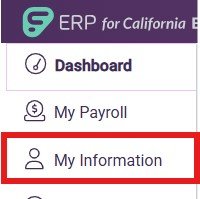
2. Click on My Information tab to the left of the page
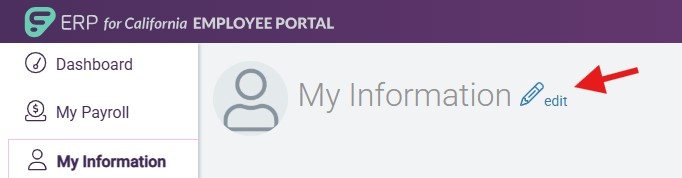
3. Select the pencil icon next to My Information At the top of the page
4. Edit your information
5. Scroll down and press submit

Important information regarding address changes:
Please note that you will need to confirm that your Health Plan provider offers coverage services within the area of your residential address. For provider plan service areas please view page 8 of the 2025 San Francisco Unified School District Health Benefits Guide.
If your current plan provider is in the plan service area of your new address, no further action is required.
If your new address is outside the area of your Provider’s plan service area, you will need to:
1. Notify the Benefits Team by submitting a ticket to http://eis.sfusd.edu to indicate you have submitted an address change so we can update the city system.
2. Submit a qualifying life event to enroll in a different SFHSS plan that offers service based on your new address within 30 days of your move.
Why am I unable to enroll my health and vision benefits in Frontline or Bswift?
HSS administers the health and vision benefit for all City and County of San Francisco Departments, including SFUSD. Because HSS is the system of record for your health/vision plan, you are required to enroll via their eBenefits self-service platform. After you submit your online enrollment to HSS, if it is processed and approved, you will be able to view your enrollment election via eBenefits.
HSS staff are available Mon - Fri, from 8a - 5p to assist with your enrollment inquiries. You can call HSS at 628-652-4700 during office hours for health and vision plan details, enrollment instructions and more.
Can I enroll my dental plan with HSS as well?
No. Dental enrollment is administered by the District, not HSS. You can enroll your dental plan via the instructions received in your benefit enrollment email if you were recently hired. During open enrollment you can make changes from 10/1/2026-10/23/2026. If you experienced a qualifying event within 30-days please submit a ticket at eis.sfusd.edu to the Benefits Team for further assistance.
How do I enroll/make changes to my dental plan?
Details: Eligible employees can cover themselves, their spouses and children up to the age of 26 for free! Please note, if adding coverage for dependents, please upload a copy of a marriage/domestic partnership certificate (for spouse), birth certificate (for child dependent), and social security card for each dependent to your application.
Enrollment:
- For 2027 open enrollment elections: please schedule an appointment with our benefit counselors by visiting the following link: https://sfusd.annualenrollment.net/. These enrollments will occur through our Benefits platform Bswift and changes will be effective 1/1/2027. View Bswift Enrollment Guide.
Log In Information
Website: sfusd.bswift.com
Username: Your SFUSD email address
Initial Password: Last four digits of your Social Security Number (SSN)
California State Teachers' Retirement System Link to this section
CalSTRS offers individual benefits Planning services at their SF location on 14th street beginning 9/16/26. CalSTRS will be offering individuals sessions now and later group sessions every other week, twice a week. Members will need to call 1-800-228-5453 option #3 to schedule. No walk – ins. Individual sessions are reserved for members who will be retiring within the next 12 months. No exceptions.
CalSTRS schedules sessions no earlier than 2 weeks and no later than 8 weeks.
This page was last updated on October 1, 2026