

Today's Update - September 10, 2025 Link to this section
Payment Methods for Paychecks
SFUSD employees can receive their paycheck via direct deposit, paper check, or through our new partnership with SchoolsFirst Federal Credit Union.
Direct Deposit (recommended):
- If you already receive your paycheck through direct deposit, no action is required
- If you need to enroll in direct deposit or change the account used for direct deposit, please complete the direct deposit authorization form and return it to the Payroll Department.
Paper Check:
- Employees will receive their paycheck as a paper check until a direct deposit request is fully processed.
- You may also choose to continue receiving your paycheck as a paper check. Please note that we strongly recommend using the direct deposit method over paper checks.
(NEW!) SchoolsFirst Federal Credit Union:
- SFUSD has partnered with SchoolsFirst Federal Credit Union to provide a secure alternative to Cash App.
- SFUSD will no longer deposit paychecks into Cash App accounts. Employees currently using Cash App must update their payment method by Sept. 30, 2025.
- To use this option, you must establish a bank card with SchoolsFirst Federal Credit Union to receive your paycheck.
- You are welcome to keep any other personal bank accounts you have.
-
Why did SFUSD choose SchoolsFirst Federal Credit Union?
- Strong reputation within strong districts
-
Convenient services for employees:
- An ATM will be installed at an accessible SFUSD location for staff, with more to follow.
- Their debit cards work at thousands of fee-free co-op locations.
If you have any questions or concerns, please submit a Zendesk ticket so we may assist you directly.
Thank you for your attention to this important update.
Previous Updates - Week of Aug. 25-29, 2025
Link to this section
Aug. 29, 2025
Frontline Payroll Marks Milestone: Nearly 9,000 Employees Processed, With Minimal Off-Cycle Checks since July Launch
- With the upcoming payroll cycle this Friday, August 29, we will have successfully processed payroll for nearly 9,000 employees since the launch of Frontline in July.
- Out of the 4,500 employees who have received a paycheck from Frontline, we have only had to process 78 off cycle checks thus far.
As-Needed Employees: Working on Interim Solution to Enter Absences in Red Rover
We want to provide an important update for as-needed employees. At this time, as-needed employees are not able to enter absences in Red Rover, whether for past dates or future dates.
Our Implementation Team is actively working on an interim solution, and we will share guidance as soon as it becomes available. In the meantime, as-needed employees should report their time off directly to their supervisor. We appreciate your patience as we address this issue.
Get Help at Procurement Clinics Starting Next Wednesday, Sept. 3:
The procurement office will be offering training clinics on the 1st and 3rd Wednesday of each month starting in September. The clinics will cover purchasing in Frontline, specifically requisitions. A member of the Contracts team will also attend and answer any questions you have.
Dates and times:
- 1st Wednesdays of the month from 12:00 pm - 1:00 pm starting on Sept. 3; Learn how to join the meeting (employee log-in required).
- 3rd Wednesdays of the month from 3:00 pm - 4:00 pm starting on Sept. 17; Learn how to join the meeting (employee log-in required).
Aug. 27, 2025
Employee Pay Schedules and Getting Help with Pay Issues
All links require employee log-in to access.
We are reaching out to share an update with all staff regarding payroll in our new system, Frontline. This week, we are processing our first full, certificated monthly payroll cycle in Frontline – an important milestone in streamlining SFUSD’s operations – after three other successful payroll cycles since transitioning to this system on July 1. Please refer to the chart below for your pay schedule.
Upcoming Pay Periods and Dates for All Employees:
| Pay Period Begin Date | Pay Period End Date | Check Date/Pay Date | |
| Full Year Monthly Employees | 8/1/25 | 8/29/25 | 8/29/25 |
| 9/1/25 | 9/30/25 | 9/30/25 | |
| School Term Monthly Employees | 8/1/25 | 8/29/25 | 8/29/25 |
| 9/1/25 | 9/30/25 | 9/30/25 | |
| Certificated Subs & Certificated Extra Wages | 8/1/25 | 8/29/25 | 9/5/25 |
| 9/1/25 | 9/30/25 | 10/3/25 | |
| Full Year Biweekly Employees | 8/13/25 | 8/26/25 | 9/3/25 |
| 8/27/25 | 9/9/25 | 9/17/25 | |
| School Term Biweekly Employees | 8/13/25 | 8/26/25 | 9/3/25 |
| 8/27/25 | 9/9/25 | 9/17/25 |
Note for New Employees: Please note that monthly paid employees who were onboarded in the Frontline system before August 25 will receive a paycheck on August 29. If a monthly paid employee was onboarded after August 25, their first paycheck will be September 30.
Upcoming Changes to Payroll Cycles and Paychecks
1) The regular bi-weekly pay cycle remains unchanged for Classified Bi-Weekly Employees.
2) The pay period for Certificated Monthly Employees is moving to a full calendar month from the first day to the last day of the month. This change aligns with industry standard practices, supports CalSTRS reporting requirements, and improves efficiency around payroll processing. Base pay will continue to be issued on the last day of the month; the only change is that the pay period it reflects will be from the 1st to the last day of the month.
3) Certificated substitute pay will be paid on the 5th of the following month. All certificated substitutes should expect to receive pay for the 1st to the end of the month on the 5th of the following month.
4) The district has transitioned to a supplemental payroll process for extended hours. Effective July 1, 2025, compensation for extended hours, including extra contract hours, extra duty, extra time, and certificated sub pay will be paid on the 5th of the following month. A separate check will be issued following submission and approval of your time. For instance, in previous pay cycles, if you worked extra contract hours, extra duty, extra time, or had certificated sub pay on the 2nd, 10th, and 14th of the month, those hours would be paid in that same month. However, going forward, you will see those hours paid on the 5th of the following month.
How to Read Your Pay Stub
We have posted an example of your new pay stub with a numbered key to help you compare it to your old pay stub.
Taxation Update
The Payroll Department has run several successful payrolls since the beginning of the fiscal year. During this process, some expected differences due to rounding and biometric timekeeping variations, which occur in every payroll system, were uncovered. These differences are based on your salary, with the larger discrepancies typically tied to higher salary levels. Please note: this does not mean your paycheck is incorrect.
In EMPowerSF/SAP, system customizations sometimes caused tax complications, and employees were advised to adjust their withholdings with a tax preparer. We recommend updating your W-4 to reflect your total combined earnings, whether you have one position or multiple positions.
How to Get Help with Pay Issues
We understand that accurate and timely pay is crucial. To ensure you receive the support you need for any pay-related concerns, we have established a multi-tiered support system.
For all pay issues, please start by submitting a Zendesk ticket. This is the most efficient way to initiate support and ensures your inquiry is routed correctly. If your pay is incorrect, please select “INCORRECT PAY” as the reason for submitting a ticket.
In-Person Assistance will be available beginning this week. On site teams at 135 Van Ness Ave. will be able to address pay issues and provide physical checks when necessary.
- Friday, Aug. 29:
- Time: 12:00 PM to 5:00 PM
- Tuesday, Sept. 2 through Friday, Sept. 5:
- Time: 10:00 AM to 6:00 PM
We are committed to resolving any pay discrepancies expeditiously. Thank you for all that you do in service of supporting SFUSD students and families.
Previous Updates - Week of Aug. 18-22, 2025
Link to this section
Aug. 22, 2025
Employees Temporarily Cannot Edit Absence/Time in Red Rover
This message is for any SFUSD employee who logs absences (also known as time off, such as sick days or vacation time) in Red Rover. As of today, Friday, August 22, all employees do not have access to create or edit past absences. For instance, if you were out sick yesterday and did not log that absence in Red Rover yesterday, you will not be able to make this change in Red Rover today. Similarly, supervisors will not be able to edit their staff timesheets retroactively for the current pay period.
We apologize for this inconvenience and we are actively working on a long-term solution. In the meantime, please submit a Zendesk ticket if you need to change an absence after the date of the absence.
We will share further updates when we have more information.
Thank you,
SFUSD Frontline and Red Rover Implementation Team
Aug. 20, 2025
3rd Biweekly Payroll in Frontline Produced Today
We have produced our 3rd biweekly payroll in Frontline today. The pay stub for biweekly employees was emailed to staff on Tuesday, Aug. 19. You can also find a copy of your pay stub in the Frontline Employee Portal under My Payroll (employee log-in required). We are grateful to our implementation team for their dedication in keeping our payroll cycle on track. If you have any questions or concerns, please submit a Zendesk ticket so we may assist you directly.
Aug. 19, 2025
New Training Resources Now Available for SFUSD Staff (All links require employee log-in)
Instructions for completing the PK-12 School Site Employee Payment Request Form
PK-12 school site employees can request reimbursement for out-of-pocket expenses by completing the PK-12 school site employee payment request form. Learn more about the process.
Roles and Responsibilities in Frontline
As SFUSD transitions to Frontline, the roles and responsibilities related to requisition submission and payment for a purchase order have changed. In Frontline, a site clerk submits the requisition and the accounts payable clerk pays the invoices. Read more about the different roles and responsibilities in Frontline.
Workflow changes from GoFast to Frontline
As SFUSD transitions from GoFast to Frontline, there are important changes to how requisitions, invoice, reimbursements, and ordering are processed. For example, requisitions and invoice payments are now handled by different staff, direct payments are processed by Accounts Payable clerks, and site clerks can use the online ordering system in Frontline. Review the full breakdown of the workflow changes.
Quick Links Now Available
Key resources are available to support the transition to Frontline, including accounting, procurement, and budget guidance. School sites can access forms for reimbursement and contract invoice notification, while staff can find training materials and analyst contact information. View the quick links for more information.
Certificated Administrator Check Sample Now Available
A sample check for certificated administrators is now available to show every section of your new pay stub. This joins the sample check for staff that was posted earlier. The numbered key defines each section, allowing you to compare it to your old pay stub.
Previous Updates - Week of Aug. 11-15
Link to this section
Aug. 14, 2025
Update: Paraeducator Vacation Payouts
SFUSD has resolved this vacation pay issue affecting some of our paraeducators. We understand the importance of timely and accurate compensation, and we appreciate the patience of our paraeducators as we worked to resolve this matter.
As of August 12:
- 125 employees received their vacation pay via direct deposit.
- 15 payments were issued via paper check.
- 14 employee checks were processed in Frontline as manual checks.
- 7 employees chose to receive their vacation pay with the upcoming August 20 payroll.
In order to address the root cause of the discrepancies, the majority of the vacation pay was issued through the EMPowerSF system, while only 14 paper checks were issued through the new system, Frontline.
If you did not receive a vacation payout and believe you are eligible, please submit a Zendesk ticket so the matter can be researched. If changes or modifications are needed, they will be made to ensure the vacation payout is processed.
We are committed to ensuring that these processes run smoothly in the future and thank you for your continued dedication to our students and school community.
Aug. 13, 2025
Thursday, Aug. 14: New Frontline Requisitions Training Opportunities for Site Leaders
Dear School Site Leaders,
In response to requests from site leaders, we're adding another virtual training designed to help you master the requisition process in the new Frontline system.
Procurement Manager Ken Neu will lead this one-hour session, where you'll learn how to navigate the requisition process.
Two additional trainings will be held on Thursday for your convenience. We encourage you to attend the session that best fits your schedule. View schedule (employee log-in required).
We look forward to the participation of our school site leaders in one of these sessions.
Sincerely,
SFUSD Frontline and Red Rover Implementation Team
Aug. 12, 2025
Red Rover Enhancement – Timesheet Updates for Exception-Based and As-Needed/Bus Paraeducator Staff
Dear SFUSD Staff,
We wanted to share an update for an enhancement in Red Rover that will streamline timesheet entries and ensure accuracy across the district effective today, August 12, 2025.
As you may be aware, exception-based employees should not record hours for their scheduled job(s) (positional schedule). Exception-based employees have schedules that are set on the back-end of Red Rover and are not viewable on the timesheet.
- If there are no changes, your timesheet will simply show "No scheduled shifts" - you don’t need to take any action.
- To view the number of hours scheduled for your pay cycle, (i.e. 80 hours for bi-weekly staff) then refer to “Total Scheduled” at the top of the current timesheet.
- For exception-based employees, the “Total To Be Paid” field should be ignored (for more information refer to slide 23 of the employee deck(employee log-in required).
To streamline and clarify the process for this employee group, the following changes have been implemented:
-
The scheduled job(s) will no longer appear in the timesheet drop-down menu when adding hours for exception-based employees only.
-
Exception-based employees may only enter:
-
Extra time / overtime
-
Stipends
-
Additional jobs
-
-
The timesheet tied to your scheduled position(s) can no longer be modified.
This change ensures that timesheet entries reflect actual hours worked and remain consistent with your assigned schedule.
As-Needed Staff and Bus Paraeducators will continue to enter time as usual.
Updated training materials for both supervisors and employees are available online on the Red Rover Resources page (employee log-in required). As we continue the transition to Red Rover and Frontline, processes may evolve, and updated guidance will be provided.
Please note:
-
The training materials are in-process of being translated in Spanish and Chinese and will be made available online at Red Rover Resources (employee log-in required). Once posted, an announcement will be sent out.
-
Virtual office hours to walk through key features in Red Rover and answer any questions you may have are being planned, we will share more information about dates and times as we finalize the schedule.
If you have any questions or concerns, please submit a Zendesk ticket so we may assist you directly.
Thank you for your ongoing support as we navigate this transition.
Sincerely,
SFUSD Frontline and Red Rover Implementation Team
Aug. 11, 2025
Case Management Walk-In Update
From August 6–8, approximately 55 walk-ins were assisted at 135 Van Ness, primarily regarding access issues in Red Rover for new hires and 11-month certificated employees, vacation payout for school-term employees and pay differential check pick-up from the August 5 payroll.
Previous Updates - Week of Aug. 4 - 8, 2025
Link to this section
August 8, 2025
New Frontline Requisitions Training for School Site Leaders
In response to requests from school site leaders, we're excited to announce a series of virtual trainings designed to help you master the requisition process in the new Frontline system.
Procurement Manager Ken Neu will lead these one-hour sessions, where you'll learn how to navigate the requisition process.
These trainings will be held next week, and we've scheduled multiple sessions for your convenience. We encourage you to attend the session that best fits your schedule. View schedule (employee log-in required).
You are also welcome to check out these additional resource options:
- SFUSD Entering and Submitting Vendor Requisitions (employee log-in required)
- Frontline Training Support (employee log-in required)
We look forward to the participation of our school site leaders in one of these sessions.
August 7, 2025
New Red Rover Training Resources Now Available for SFUSD Staff
Additional training materials are now available online on the Red Rover Resources page (employee log-in required) to support both employees and supervisors in entering, reviewing, and approving time and absences in the new absence and time tracking system, Red Rover.
These resources are specific to how SFUSD uses Red Rover and include:
- Role-specific instructions for exception-based and as-needed employees, including step-by-step guides for entering time and absences.
- Supervisor instructions for approving and editing time entry for both employee types.
- Tips, resources, and upcoming enhancements in Red Rover to be aware of.
Please note: Exception-based employees should not modify timesheets, and as-needed employees should not enter time for dates before their official start date. However, all employees may enter absences in advance for any dates on or after their official start date.
We are asking all staff to review the resources relevant to their role; if you have any issues, please submit a ticket via Zendesk. Your input helps us ensure that the instructions are clear, accurate, and useful. Understanding what is effective and what is not allows us to continuously improve and better meet the needs of our colleagues.
Please note:
- As we continue the transition to Red Rover and Frontline, processes may evolve, and updated guidance will be provided.
- The training materials will be translated in Spanish and Chinese and will be made available next week online at Red Rover Resources. Once posted, an announcement will be sent out.
- As part of our ongoing transition, we are scheduling virtual office hours to walk through key features in Red Rover and answer any questions you may have. We will share more information about dates and times as we finalize the schedule.
If you have any questions or concerns, please submit a Zendesk ticket so we may assist you directly.
August 5, 2025
How to Get Support With Your Paycheck or Other Questions
- In Person: Please come to 135 Van Ness Ave. between 10 am - 6 pm on August 6-8 to meet with the Resolution Team for in person support.
- Help Ticket: You can submit a Zendesk ticket at any time.
On Track for the 3rd Payroll from Frontline
We are on track to produce our third payroll in Frontline. This is a significant milestone in our successful transition to the new system. We appreciate the collaboration and hard work from everyone involved. Please know that we remain committed to providing staff with accurate and accessible information to access the new ERP and HCM systems.
Previous Updates - Week of July 28-Aug. 1, 2025
Link to this section
August 1, 2025
Resolution Team Support and System Updates
Between July 30–31, the Resolution Team provided in-person support to approximately 60 employees between the All Admin Institute and 135 Van Ness administrative building. Nine manual paychecks were issued, with an additional seven cases currently under review for processing. Common support needs remain consistent with previous trends, including correcting position discrepancies as employees are aligned to the appropriate calendars, addressing leave balances that are not yet displaying; tax calculations and Red Rover functionality. These items are actively being worked on and remain a top priority for resolution.
July 31, 2025
Acknowledging the Changes and Your Concerns
We recognize that the instructions for recording your time in Red Rover have shifted since the initial launch. We are also aware that there have been mixed messages and issues regarding the transfer of vacation and leave balances from EMPowerSF, as well as concerns about real-time updates and accruals. This inconsistency is not what we intended, and we apologize for the additional burden it has placed on you.
Clarifying Current Time Entry Instructions in Red Rover
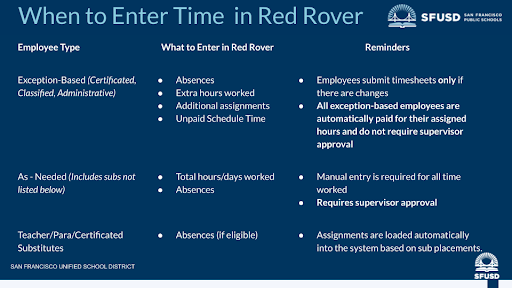
To ensure your hours are accurately recorded for the current and upcoming pay periods, SFUSD employees should enter their time in Red Rover based on their employee classification:
Exception-based employees: Within Red Rover, exception-based employees should only enter unscheduled work and absences that require supervisor review and approval. We ask that employees do not override or adjust their pre-populated work schedules in Red Rover as these schedules are based on assigned hours. In the coming weeks, pre-populated schedules in Red Rover for exception-based employees will only be modifiable by supervisors to help prevent errors and ensure proper recordkeeping. We understand this is a change from the "add shift hours" link initially rolled out, and we appreciate your adaptability.
As-needed employees: As-needed employees do not have scheduled hours and are required to manually enter each day worked. This includes total hours or days worked and absences. All entries require supervisor approval.
Updates on Leave Balance Details
The total leave balance in Red Rover is currently unavailable. We expect this to be resolved in the coming weeks. Please also note that detailed records of individual leave dates from EMPowerSF will not be visible in Red Rover at the completion of the data transfer.
While leave accruals are currently being processed in Frontline, their visibility is pending. We're working to finalize calculations, after which balances will appear in Frontline and then transfer to Red Rover for balance and usage display. We anticipate full functionality in the upcoming weeks. Red Rover is the system to use for absence requests, and through data transfers, the actual deductions from your leave banks, occur in Frontline.
In the meantime, if you need a detailed history of your past leave, or notice discrepancies, please submit a Zendesk ticket, and we will assist you.
Processing Retroactive Timesheet Changes from Workforce/EMPowerSF
As of July 1, 2025, employees can no longer update their timesheets directly in the Workforce (EMPowerSF) system, as access has been removed. We recognize that employees may need to retroactively change timesheets for periods before this date.
For timesheet corrections for pay periods before July 1, 2025, please follow this process:
- Submit a Zendesk ticket detailing the required correction.
- The Case Management Team will review entries in the former Workforce system and make updates in the new system.
- Payroll will issue any necessary payment through the new system, Frontline.
Important: Retroactive timesheet corrections for pay periods before July 1, 2025, must be submitted by September 30, 2025.
How Leaves Will be Reflected in Paychecks
As we transition to the new system, how approved leave is reflected on your paychecks will change.
For all employees, approved time off between the 21st of one month and the 20th of the next will have the deduction appear on the paycheck issued in the following month’s pay cycle. While your leave balance is updated in Frontline as of the 20th of each month, the leave balance shown on your paycheck may lag behind your actual, most up-to-date balance. How your balance is displayed going forward will be dependent on whether you are paid monthly or bi-weekly.
To ensure you have the most accurate leave information, please continue to refer to the Employee Portal in Frontline, which will reflect current leave usage and balances in real-time.
Support and Next Steps
We appreciate that many of you have already submitted tickets regarding these issues. This is the correct procedure, and it helps us track and address each specific problem. Please continue to submit a ticket for any discrepancies or questions you have.
We are committed to resolving these issues and improving your experience with Red Rover. Your patience and cooperation during this transition are invaluable.
July 29, 2025
During the All Admin Institute on July 30-31, the Resolution Team will be available on-site at John O’Connell High School to help with any payroll issues.
Certificated monthly employees will be paid on July 31. For those receiving direct deposits, the pay stub for monthly certificated employees will be available on Wednesday, July 30. A notification with a link to access the pay stub will be sent to employees on July 30. Also included in this payroll are some 12 month certificated employees such as EED, ROTC and the ADG group.
If you have direct deposit and haven't received this notification by 10:00 AM on July 30, please submit a Zendesk ticket immediately. If you do not have direct deposit, paper checks were mailed on Tuesday, July 29 and you can expect your check by mail. This will help us quickly address a potential issue that could impact your upcoming payment.
Resolving an Underpayment: Your Steps to a Next-Day Check
During the transition phase of moving all payroll operations to Frontline, please use the following guidance if you believe you've been underpaid and qualify for a next-day check. Here are the steps that will be taken to resolve the issue:
- Submit a Ticket: Submit a ticket via Zendesk so that the Response Team can confirm that you were underpaid by a gross amount of $50 or more.
- Investigation Phase: The Response Team will coordinate among departments including HR, benefits, and the employee’s department and/or supervisor to determine the root cause of the payroll discrepancy.
- Check Availability: The Response Team will notify you when your manual check is ready for pickup or distribution. We aim to resolve all payroll issues within 48 hours.
July 28, 2025
Help Tickets Processed
The Resolution Team received and processed 14 tickets via the Help Desk over the weekend.
Frontline Certificated Monthly Payroll July 31, 2025
For those receiving direct deposits, the pay stub for monthly certificated employees will be available on Wednesday, July 30. A notification with a link to access the pay stub will be sent to employees on July 30. Also included in this payroll are some 12 month certificated employees such as EED, ROTC and the ADG group.
If you have direct deposit and haven't received this notification by 10:00 AM on July 30, please submit a Zendesk ticket immediately. If you do not have direct deposit, paper checks were mailed on Tuesday, July 29th and you can expect your check by mail. This will help us quickly address a potential issue that could impact your upcoming payment.
Previous Updates - Week of July 22-25, 2025
Link to this section
July 25, 2025
Payroll and Timekeeping Summary
Recent payroll and timekeeping issues are being addressed with both immediate fixes to minimize disruption for employees and through long-term systems solutions, including standardizing SFUSD’s business processes. Our priority remains paying our employees on time. Here is a summary of work in progress:
- Paystubs improvements: Pay rate details were reportedly not displayed on check stubs. We are actively working on this issue.
- Aligning SFUSD with industry standards: Frontline is functioning as a turn-key K-12 system. By design, a successful implementation of the system requires SFUSD aligns its business practices and operational systems with industry standards. Previous rules allowed by our patchwork systems are no longer possible in Frontline. For example, employees on a school-term calendar who work during summer have historically been treated as year-round staff in our systems. We are actively working with affected employees to address issues associated with the transition.
-
Time keeping and reporting: To address confusion related to time entry and approval in Red Rover, SFUSD employees enter their time in Red Rover in accordance with their employee classification:
- Exception-Based Employees are only required to enter time for unscheduled work, absences, or additional assignments that are not part of their regular schedule. When additional hours are worked, employees should enter this time separately using the appropriate entry type, rather than modifying their pre-populated schedule.
- As-Needed Employees are required to manually enter each day worked. This includes daily time worked, extra hours, additional assignments, and absences. All entries require supervisor approval.
Resolution Team Support and System Resolutions
- Approximately 25 employees received in-person assistance on Thursday, July 24.
- 8 manual paychecks were issued to resolve immediate concerns.
- Position code discrepancies are being corrected as employees are transitioned to the appropriate calendars.
- Investigations and resolutions are underway regarding a few accidental terminations.
- Accruals/ Leave balances not displaying currently but being addressed for resolution.
Frontline System Temporarily Unavailable on Friday Evening
Please be advised that the Frontline system will be unavailable tonight between 6:00 PM and 7:00 PM due to system maintenance.
July 24, 2025
Resolving an Underpayment: Your Steps to a Next-Day Check
During the transition phase of moving all payroll operations to Frontline, please use the following guidance if you believe you've been underpaid and qualify for a next-day check. Here are the steps that will be taken to resolve the issue:
- Submit a Ticket: Submit a ticket via Zendesk so that the Response Team can confirm that you were underpaid by a gross amount of $50 or more.
- Investigation Phase: The Response Team will coordinate among departments including HR, benefits, and the employee’s department and/or supervisor to determine the root cause of the payroll discrepancy.
- Check Availability: The Response Team will notify you when your manual check is ready for pickup or distribution. We aim to resolve all payroll issues within 48 hours.
Leave Balances Are Currently Only Available in Frontline
We are still in the process of transferring leave balances to Red Rover and onboarding employees to have access to their Red Rover account and leave balances. Prior activities related to employee leaves are available as view-only in EMPowerSF, but will be available in Red Rover. In the meantime, you can review your leave balances in the Frontline Employee Portal. Also, your leave balance is currently not showing up on paychecks but we expect they will be available on paychecks by September 2025.
Supplemental Payroll for Extended Hours - Effective July 1, 2025*
*Please note this date has been corrected from August 1 to July 1
The District will transition to a supplemental payroll process for extended hours. Effective July 1, 2025, compensation for extended hours, including extra contract hours, extra duty, extra time, and certificated sub pay will be paid on the 5th of the following month. A separate check will be issued following submission and approval of your time.
Completing Our First Payroll in the New System
Approximately 75 people visited the Resolution Center on July 23 for various reasons. At the Resolution Center, 13 same-day checks were issued to ensure everyone received their rightful pay. These issues primarily stemmed from differences between the old and new systems, such as manual overtime selection, varying pay period interpretations between Frontline and Empower, and confusion around supplemental payroll for July 23, particularly for substitutes. We also identified payment problems for employees on special assignments or working outside their assigned calendars, as well as instances of extra hours and add-ons not being paid, and time entry issues due to changing system configurations.
July 23, 2025
New In-Person Case Management Support
Today, SFUSD launched an in person case management team for employees. Moving forward, SFUSD will include daily updates on the number of issues that were addressed as well as an overview of the types of issues.
Coming Soon: How to Read Your Pay Stub
SFUSD is finalizing a visual guide of how to read and understand your pay stub. This information will be posted to the Employee Frontline/Red Rover website.
July 22, 2025
Pay Stubs for Bi-Weekly Classified Employees
The pay stub for bi-weekly classified employees was emailed to staff on Tuesday, July 22. Employees in this category who did not receive this notification by 10:00 am on July 22 should submit a Zendesk ticket.
Early Education Substitute Employees
We notified early education substitute employees that their pay schedule is shifting from biweekly to monthly as part of SFUSD’s transition from EMPowerSF to Frontline, per the Collective Bargaining Agreement. To prevent delays, information was shared with these employees that they may pick up paper checks Wednesday, July 23.
Website Updates
As part of our commitment to continuous improvement, we are updating the internal and external websites dedicated to Frontline and Red Rover to center the user experience.
This page was last updated on September 10, 2025