

Announcement Details
Posted on
Grade Level
Early Education
Elementary School
K-8 School
Announcement Message
If your student has been using Seesaw this year, you still have time to download their entire journal or specific posts, including student work, pictures, and videos. To do so, make sure you’re accessing Seesaw from a computer, via the Chrome or Firefox browser. Then…
Follow the steps linked here to download your student’s entire Seesaw journal for their current class.
Or, to download specific journal posts:
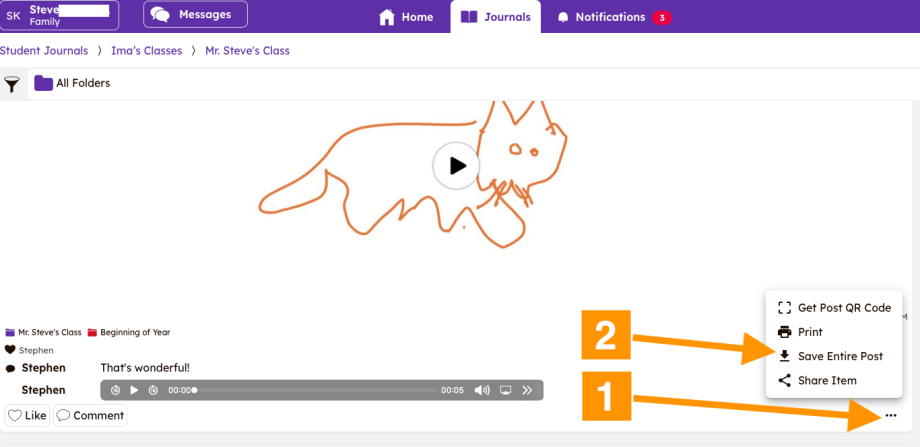
- Click on the three dots at the bottom-right of the journal entry. A popup menu will appear.
- Click “Save Entire Post.” This will cause a compressed file, called a “Zip” file to download to your computer.
- “Unpack” the .zip file by double-clicking on it in your computer’s Downloads folder. A new folder with a few files in it will appear in your Downloads folder.
- Now you can move the files that were just created to wherever you keep your student’s work.
If you have any related questions or need support with this process, the Student Family School Resource Link is here to help at familylink.sfusd.edu, via email at sflink@sfusd.edu or by calling (415) 340-1716.