

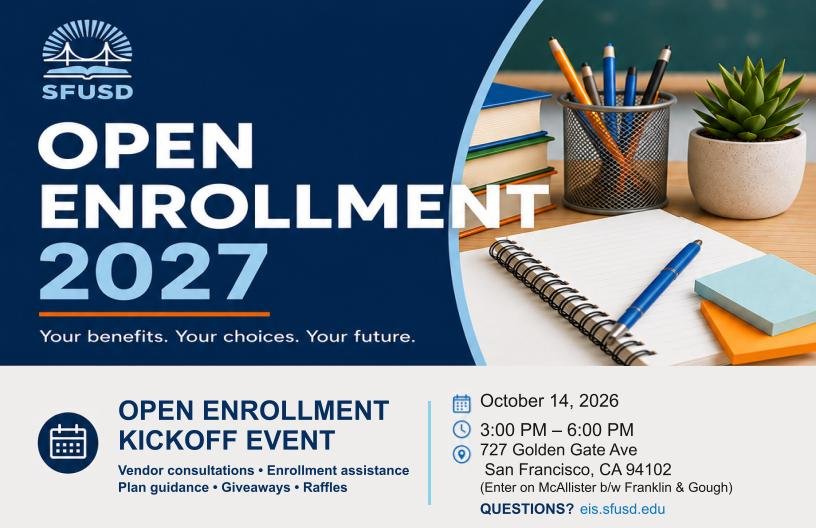
2027 Open Enrollment Benefits Fair - 10/14/26 Link to this section
We invite you to join us for the 2027 Open Enrollment Benefits Fair, hosted by the Benefits Team!
📅 Date: October 14, 2026
🕒 Time: 3:00 PM–6:00 PM
This is a great opportunity to learn more about your benefits and get personalized assistance with your open enrollment choices.
At the Benefits Fair, employees will be able to:
Meet with benefit vendors and receive one-on-one consultations
Get assistance with the enrollment process
Ask questions and receive guidance on available plans
Explore benefit options and resources
Enter for raffle prizes and receive vendor giveaways
We are excited to announce the participating vendors who will be available at the event:
HSS Member Services
Kaiser
Blue Shield
VSP
Aflac
Delta Dental
Symetra
SchoolsFirst
Washington National
CalSTRS
Please note: This is only a partial list of participating vendors.
We look forward to seeing you there and helping you make informed choices during the 2027 Open Enrollment period!
Webinar Wednesdays Link to this section
Throughout the month of Open Enrollment, webinars will be hosted on Wednesdays! Please view our OE webinar schedule!
What is open enrollment? Link to this section
Open Enrollment (OE) is your annual opportunity to review and update your SFUSD-administered benefits and your medical and vision benefits. This year’s enrollment is passive, meaning for all eligible employees if you're satisfied with your current elections and do not need to make any updates, no further action is required. The exceptions are Flexible Spending Accounts (Health Care FSA and Dependent Care FSA), which require you to log into Bswift to make your FSA elections for the 2027 plan year if you wish to be enrolled. If no action is taken for FSA, your current FSA elections will end on December 31, 2026. The 2027 FSA maximums are $3,400 for a medical FSA and $7,500 for a dependent care FSA. We encourage all employee to take time to review their current benefit elections to ensure they still meet their needs.
During Open Enrollment you can take the following action to :
- Enroll or re-enroll in medical, vision, dental, Flexible spending accounts, and other voluntary benefits
- Add or drop dependents from coverage
- Decline coverage
SFUSD-Administered Benefits (Dental, Aflac, Voluntary Benefits)
The San Francisco Unified School District’s Open Enrollment period will take place October 1 – 23, 2026, 5PM Pacific Time in Bswift. Check out the Bswift Employee OE Tips and Tricks Guide!
SFUSD-administered benefits includes:
- Symetra (district paid accident, life, long term disability insurance and voluntary buy up options)
- Health Equity Flexible Spending Accounts (Health Care FSA and Dependent Care FSA)
- Aflac (voluntary accident, cancer, critical illness, and Short-term disability insurance)
- Delta Dental (district paid dental insurance and voluntary buy up options)
New Delta Dental program
Delta Dental’s Next Stage™ Women’s Health program offers enhanced dental benefits for eligible Delta Dental PPO members experiencing pregnancy or menopause. Members who qualify and opt in may receive additional exams, cleanings or periodontal care, bitewing X-rays, and fluoride treatments, subject to plan terms. Learn about eligibility and registration at Delta Dental’s Next Stage page.
Medical and Vision Benefits (SFHSS – City & County of San Francisco)
The San Francisco Health Service System (SFHSS) Open Enrollment for medical and vision benefits is October 1 – 23, 2026, 5PM Pacific Time. Employees who want to make changes to their medical and vision benefits need to do so directly through SFHSS via eBenefits. Plan options and enrollment information can be found at this link: https://sfhss.org/oe-sfusd. Use this detailed guide to help you navigate SF My Hub: SF My Hub Navigation Instructions.
Support During Open Enrollment! Link to this section
Need Help?
- Schedule a 1:1 appointment with an enrollment counselor: https://sfusd.annualenrollment.net/.
- View FAQs: SFUSD Open Enrollment 2027 – Frequently Asked Questions (FAQs)
- Check out the Bswift Employee OE Tips and Tricks Guide!
Information from SFHSS about Health/Vision plans for 2027 Link to this section
Medical and Vision Benefits (SFHSS – City & County of San Francisco)
The San Francisco Health Service System (SFHSS) Open Enrollment for medical and vision benefits begins October 1 through October 23, 2026, 5:00 p.m. P.T. Employees who wish to make changes to their medical and vision benefits must do so directly through SFHSS via their eBenefits self-service platform. Use this detailed guide to help you navigate SF My Hub: SF My Hub Navigation Instructions. Plan options and enrollment information can be found at this link: https://sfhss.org/oe-sfusd.
Important change: Health Net CanopyCare HMO
Health Net has announced that it will exit the California health insurance market effective February 28, 2027. Current Health Net CanopyCare HMO coverage is expected to continue through February, but members will likely need to transition to another medical plan effective March 1. If you currently have Health Net, we strongly encourage you to compare other medical plans and select one during Open Enrollment to reduce the chance of a disruption to your care. Consider the February end date before choosing Health Net for 2027, and check whether your providers participate in any plan you are considering.
Digital Open Enrollment communications are coming soon
SFHSS plans to transition members to email communications, with faster updates and direct links to benefit information and SF My Hub. This may be your last year receiving a mailed Open Enrollment letter. To continue receiving information about benefit changes and enrollment deadlines:
- Review and update both your home and work email addresses through your employee portal.
- Visit the SFHSS Open Enrollment resources page and follow the instructions under “How to Opt Back In To Receive Open Enrollment Email Communications,” including the SFHSS monthly newsletter.
SF My Hub/My Portal Login
|
If you're unable to access SF My Hub/My Portal, follow the Multi-Factor Authentication (MFA) Guide for step-by-step instructions or review the FAQs for additional assistance. If you still can't log in, contact the San Francisco Department of Technology (DT) Service Desk at (628) 652-5000 or email dtis.helpdesk@sfgov.org. |
Affordable Care Act Enrollment Link to this section
Employees who receive benefits through the Affordable Care Act (ACA) are not eligible to schedule appointments with enrollment counselors. ACA enrollment and benefit changes will follow a separate process. Detailed instructions will be sent to impacted employees through their SFUSD district email. Check out the 2027 ACA FAQ!
Key Enrollment Information (by Benefit)
Link to this section
Below are instructions for changing certain elections during open enrollment. After Open enrollment, no changes can be made to the below unless you have a qualifying life event.
I want to make changes to my medical or vision coverage
Medical and Vision Benefits (SFHSS – City & County of San Francisco)
If you need to make changes to your medical or vision plan options, you can complete your Open Enrollment elections online through SF My Hub. Use this detailed guide to help you navigate SF My Hub: SF My Hub Navigation Instructions.
Changes to dependents:
During Open Enrollment, you can add or remove dependents from your health plan while you're in SF My Hub. Follow the SF My Hub Navigation Instructions to enroll a dependent.
To disenroll a dependent, deselect the checkbox next to their name and follow the instructions as shown on page 8.
For more information please visit SFHSS’ open enrollment site: https://sfhss.org/oe-sfusd.
I want to contribute to a healthcare or dependent care FSA
Health Equity (Wageworks)- is our benefit partner for Flexible Spending Accounts, Commuter Transit, & Parking.
Healthcare Flexible Spending Account
A Healthcare Flexible Savings Account (HCFSA) lets you use tax-free money to pay for eligible medical expenses.
- The contribution limit for 2027 is $3,400. The amount you are able to rollover to the following year is $680.
- A debit card will be mailed to you and is loaded with your elected annual contribution amount.
- Fast, convenient payments and reimbursement
-
Documentation that includes the following should be provided:
- Names of providers
- Names of persons who received care or service
- Dates of service or care
- Descriptions of services
- Costs of service or care
Dependent Care Flexible Spending Account
A Dependent Care Flexible Savings Account (DCFSA) lets you use tax-free money to pay for eligible dependent care expenses.
- The contribution limit for 2027 is $7,500 there is no rollover
- A debit card is not provided for the DCFSA. You will need to submit a claim for reimbursement via a claim form or through the EZ receipts mobile app.
-
Documentation that includes the following should be provided:
- Names of providers
- Names of persons who received care or service
- Dates of service or care
- Descriptions of services
- Costs of service or care
Enrollment:
- For 2027 open enrollment elections: please schedule an appointment with our benefit counselors by visiting the following link: https://sfusd.annualenrollment.net/. These enrollments will occur through our Benefits platform Bswift and changes will be effective 1/1/2027. Check out the Bswift Employee OE Tips and Tricks Guide!
- Commuter and Parking: you may enroll via www.wageworks.com. Pre-tax maximum for 2027- Coming Soon!
WageWorks Commuter Benefit Accounts
Please note that FSA elections do not automatically renew every year.
I want to add a dependent to my dental coverage
Details: Eligible employees can cover themselves, their spouses and children up to the age of 26 for free! Please note, if adding coverage for dependents, please upload a copy of a marriage/domestic partnership certificate (for spouse), birth certificate (for child dependent), and social security card for each dependent to your application.
Enrollment:
- For 2027 open enrollment elections: please schedule an appointment with our benefit counselors by visiting the following link: https://sfusd.annualenrollment.net/. These enrollments will occur through our Benefits platform Bswift and changes will be effective 1/1/2027. Check out the Bswift Employee OE Tips and Tricks Guide!
Log In Information
Website: sfusd.bswift.com
Username: Your SFUSD email address
Initial Password: Last four digits of your Social Security Number (SSN)
I want to elect Aflac or update my AFLAC plan
When life gives you setbacks, Aflac is here to help you make a comeback with accident, cancer, critical illness, and dental plans. Especially relevant for expectant parents, the Short-term disability policy can add extra financial support for new parents on leave! Watch this video for more information!
🌟 New Aflac Coverage Options
We’re excited to introduce new voluntary benefits designed to support your health and financial well-being — now easier than ever to enroll through BSwift!
- Hospital Indemnity Insurance: Helps cover unexpected costs from hospital stays
- Accident Insurance: Provides financial protection for unexpected injuries
- Critical Illness Insurance: Offers a lump-sum benefit upon diagnosis of covered conditions
Enrollment:
For 2027 open enrollment elections: please schedule an appointment with our benefit counselors by visiting the following link: https://sfusd.annualenrollment.net/. These enrollments will occur through our Benefits platform Bswift and changes will be effective 1/1/2027. Check out the Bswift Employee OE Tips and Tricks Guide!
Log In Information
Website: sfusd.bswift.com
Username: Your SFUSD email address
Initial Password: Last four digits of your Social Security Number (SSN)
I want to update my Life Insurance Beneficiaries for Symetra
If you are a Classified, Certificated or Administrator employee working at least 0.5 FTE you are eligible for the district's $25K Life insurance/Long-term disability policy through Symetra. Additionally there are new voluntary plan options.
During Open Enrollment, you will be able to view more information in Bswift.
Enrollment:
- For 2027 open enrollment elections: please schedule an appointment with our benefit counselors by visiting the following link: https://sfusd.annualenrollment.net/. These enrollments will occur through our Benefits platform Bswift and changes will be effective 1/1/2027. Check out the Bswift Employee OE Tips and Tricks Guide!
Log In Information
Website: sfusd.bswift.com
Username: Your SFUSD email address
Initial Password: Last four digits of your Social Security Number (SSN)
This page was last updated on October 13, 2026