

Find Your Menu Link to this section
Come Dine With SNS! Link to this section
All SFUSD Students can eat nutritious meals at no cost to them. Take advantage of the meal program to save time and money!
How to find the menu for your school: Link to this section
We currently have 4 menus offered in SFUSD; follow the steps below to find yours.
- Review this list to Find Your School & the Menu Type
- Click the Corresponding Section to Find Your Menu
Printed monthly menus are available in cafeterias and/or school offices for you or your child’s reference.
Follow the sections below for more information on menus, allergen and nutritional information, and how to provide feedback.
Questions about your menu? Contact us at SchoolLunch@sfusd.edu.
Translation Instructions
Link to this section
PDF Menu Translation Instructions
How to Translate a PDF Menu via Google Translate
- Find the menu you’d like to download
- Download that menu
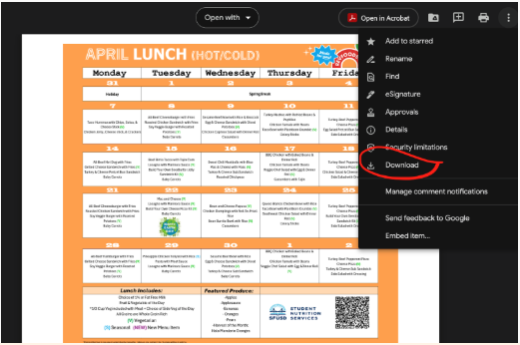
- Navigate to Google Translate - Translate documents and websites
- Select Documents
-
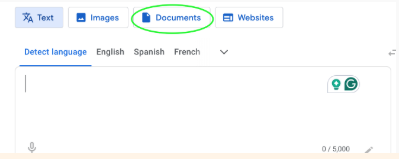
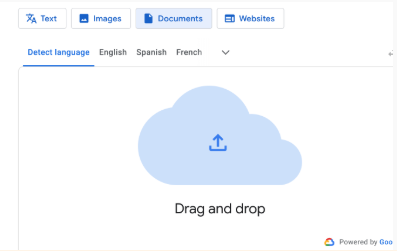
- Open your downloads folder to find your menu file.
- Click and drag your menu file into the Google Translate Documents window OR browse your files to upload.
- Select the language you’d like to translate to.
- Click “Translate”.
- Click “Download Translation” or “Open Translation” to view.
- Review the translated menu.


Refresh & McAteer Culinary Center Menus
Link to this section
-

Breakfast & Lunch October | November: A.P. Giannini, Aptos, Balboa, Everett, Galileo, Herbert Hoover, James Lick, Lincoln, Marina, Presidio, Roosevelt, Washington, Mission, Ruth Asawa School of the Arts (SOTA).
Breakfast in the Classroom (BIC) Hot/Cold & Lunch October | November - available at Willie Brown, Thurgood Marshall, Dr. Martin Luther King.
Supper October | November: available at AP Giannini, Aptos, Willie Brown, Everett, Herbert Hoover, Dr. Martin L. King, James Lick, Marina, Presidio, Roosevelt, Balboa, Mission
Refresh & McAteer Culinary Center Menus
Link to this section
-

Sites Served by McAteer Culinary Center (Other Campuses)
MCC Breakfast & Lunch October | November: menu available at Independence HS, Hilltop, Civic Center, Ida B. Wells, John O'Connell, Bessie Carmichael FEC, and Downtown.
MCC Breakfast, Lunch & Supper October | November: menu available at Hilltop & John O'Connell. (Supper is a community program. Any youth 18 years and younger are welcome to get a meal from one of these sites.)
The LunchMaster Menus
Link to this section
-

Breakfast & Lunch (Hot/Cold) October | November: available at the sites labeled "The LunchMaster" on this list. Any sites listed separately below have the menus listed.
Breakfast & Lunch (Cold) October | November: YMCA Embarcadero (CARE Youth Chance HS).
Breakfast in the Classroom & Lunch (Hot/Cold) October | November: Bret Harte, GW Carver, Cobb, Drew, Hillcrest, Malcolm X, (Due to ongoing construction - Denman), SFI
Supper October | November: available at the sites labeled "The LunchMaster" on this list with a "Yes" in the Supper column.
Revolution Foods Menus
Link to this section
-

Pre-K Breakfast, Lunch, and Snack October | November: menu available at Pre-K schools situated on elementary school campuses and all standalone early education schools. (Pre-K Snack is only provided to year-round, full-day Pre-K programs, per the CACFP.)
Breakfast & Lunch (Hot/Cold) October | November: available at sites labeled "Rev Foods" on this list.
BIC & Lunch October | November: available at sites labeled "Rev Foods" on this list with a "BIC" in the BIC Column.
Supper October | November: available at the sites labeled "Rev Foods" on this list with a "Yes" in the Supper column.
Temporary Menu
Link to this section
-
Note: All menus are subject to change without notice.
Breakfast & Lunch (Hot/Cold):
SchoolCafe Menus Link to this section
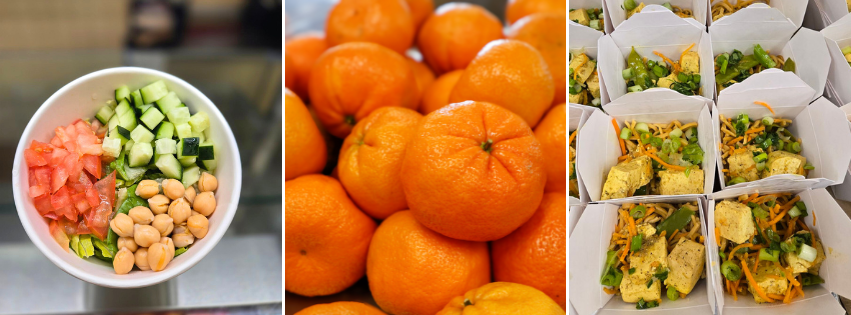
Menus for all Refresh school meals are available at SchoolCafe.com/sfusd. Menus are posted 1 week at a time. You can view the menu with or without a SchoolCafe account.
- Go to SchoolCafe.com/sfusd. Select “View menus (as a guest)” or sign in.
- Choose a view option of a Daily, Weekly, or Monthly calendar
- From the drop downs, select School and Meal Type
- From the weekly or monthly views, check off all the categories you would like to view (ie. Hot or Cold entree, Vegetable, Fruit)
View on SchoolCafe Link to this section

Find Menu Nutrition Information Link to this section
Refresh Menus - Nutrition and Allergen Information:
- Locate your menu on SchoolCafe.
- From the Daily view, view allergens, calories, and carbohydrates for everything on the menu that day. Click on “Make a Tray” to select a variety of food groups and see a total nutrition count for the day!
- From the Monthly view, turn on the “Show Nutrients” function to view more nutrition information.
The LunchMaster & Revolution Foods Menus - Nutrition and Allergen Information:
- Find nutritional analysis (Carbs, Calories, and Allergens) for The LunchMaster Menus in our Allergen Reports, Nutritional Analysis, and Ingredients List Google Drive Folder.
Menus Are Subject To Change Link to this section
We are currently facing unprecedented supply chain challenges that impact manufacturing and distribution of some foods and ingredients. Other circumstances also arise on occasion, such as the inability to staff our schools. This means we sometimes need to serve a different meal than what is posted on the menu with little to no notice. This situation is out of our control and something that school districts all across the country are experiencing. We are doing our best every day to come up with solutions to these challenges, including working hard with our vendors to secure meals as published and minimize meal substitutions to our best ability.
Rest assured, all SFUSD meals will continue to follow our strict nutritional, culinary and wellness guidelines to ensure students have the choice of nutritious meals every school day. We will also continue to accommodate students with special diets and allergies.
We appreciate your support and understanding. Please contact us at SchoolLunch@sfusd.edu if you have any questions or feedback.
This page was last updated on October 28, 2026