

Complete the Emergency Card Form Link to this section
Families can complete the Emergency Card form online through ParentVUE. If you already submitted a paper emergency card to your school, no further action is required. If you would like to submit a paper application, please contact School Health Programs (SHP).
If you need access to a ParentVUE account, please contact your school site.
Watch the videos above or follow the steps below to get started: Link to this section
- Login to ParentVUE. On your web browser, enter portal.sfusd.edu.
- Click ParentVUE > click on Family Portal (ParentVUE) enter username and password. Click Login.
Click Enrollment Forms in the web browser. If using the mobile app, click Online Registration.
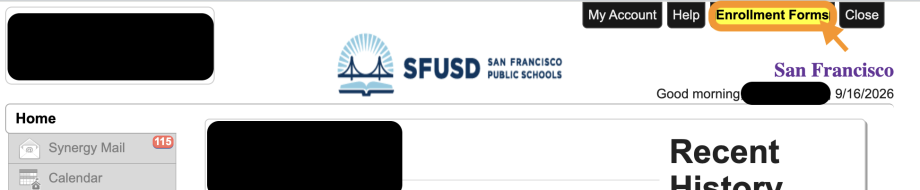
ParentVUE web browser 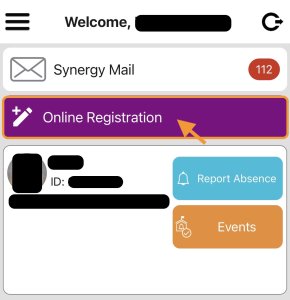
ParentVUE mobile app Select “Student Emergency Card Updates”. Note: the online emergency card is in our Enrollment Forms portal. Please complete this even if you are not registering your student(s) for a new school.
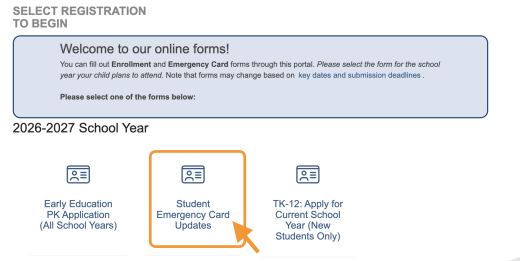
Complete each section and review all of your information before submitting the application.
For more information, view our guides: English | 中文 | Español | Tagalog | Tiếng Việt | عربى
Step by step instructions
Link to this section
This page was last updated on September 16, 2026