

Onboarding Link to this section
Step 1: Complete the Google Form and it will generate the Individual Services Agreement (ISA).
The ISA form will be emailed to you in a separate email upon filling out the Google form above.
Please sign the form, ensure that your start date is correct then send them back to studentteacher@sfusd.edu
Step 2: Schedule a TB test or have your doctor fill out a Risk Assessment Form before your Fingerprinting date. Results must be 60 days before the first day you request your placement to start.
- If you already have a negative TB test with your university, ask your primary care doctor to sign this form. You do not need to redo the TB test.
- Here is a list of places to schedule a free or low-cost TB test.
Step 3: Schedule and secure a Fingerprinting/Background Check appointment
Skip Step 3 if you are a current SFUSD employee, your fingerprints are on file with the district already.
These links will allow you to identify a fingerprint location within a California city location that works for you:
- Schedule at this link to be fingerprinted
- You will be asked to provide your personal email, and will be given a security code to schedule your appointment through their portal.
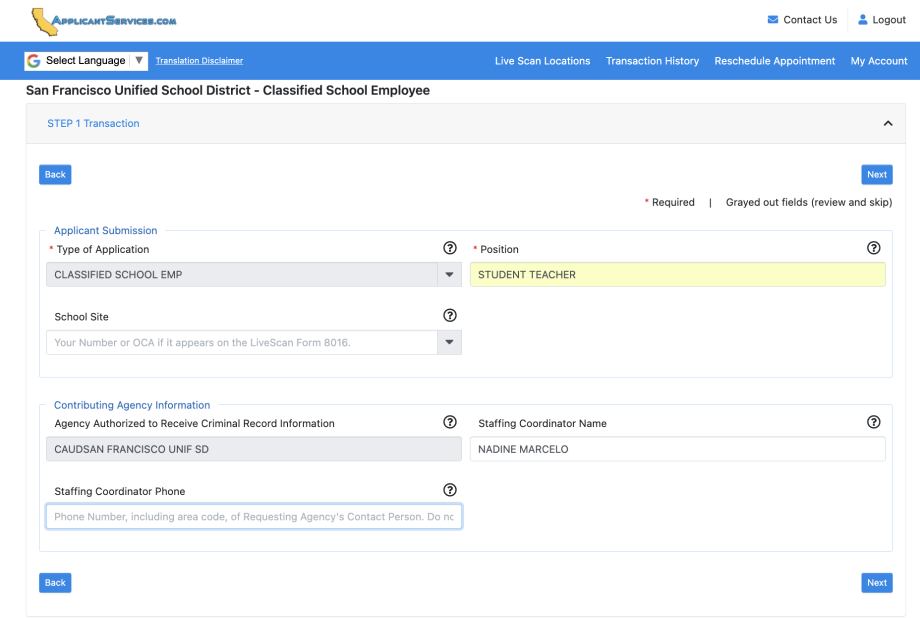
- Please fill out the information as shown by the example image below.
- The ORI code for SFUSD is 09876
- Your designation is as a volunteer not an employee
Deadlines Link to this section
SFUSD requires all student teachers to complete onboarding and have their Individual Service Agreement approved by the SFUSD Board of Education at Monthly meetings. This must be completed before they begin their placements. Please review this calendar to make sure you’re on track with the deadlines.
We also would not accept student teacher placements once the semester is halfway through.
Individual Service Agreement Directions sent to Student Teachers via their University | Start student teaching on or after: |
Deadline to complete |
Fall 2026 Start | August 17, 2026 | July 20, 2026 |
| September 9, 2026 | August 28, 2026 (tentative) | |
| October 14, 2026 | September 25, 2026 | |
Spring 2027 Start | January 4, 2027 | November 27, 2026 |
| February 10, 2027 | January 22, 2027 | |
| March 10, 2027 | February 19, 2027 | |
| Summer 2027 Start | June 15, 2027 | June 4, 2027 |
This page was last updated on September 14, 2026